Goal: validate CSV export, including empty input, before calling it complete.
Maintainer-approved decision: keep the existing export API for compatibility.
Result: two sample export checks passed; full validation has not run.
Blocker: the empty-input fixture is missing, so that check cannot run yet.
Next action: add the empty-input fixture, then run that check.OPEN SOURCE · FOR CODEX & CLAUDE CODE
Your next session.
Less starting over.
Give your AI coding agent a simple way to save decisions, current work and next steps in Markdown. Pick up the project without inventing a context-management system.
Your files. Your repository. A workflow you can review.
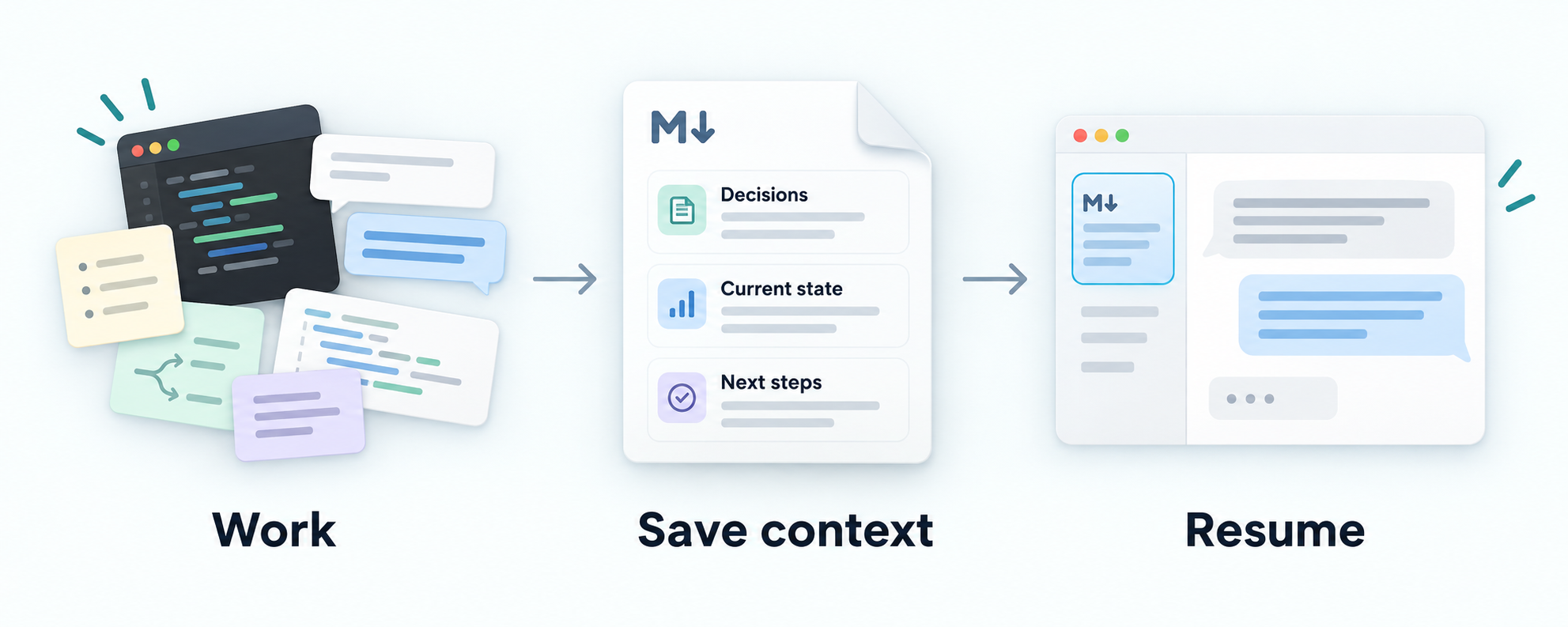
THE WORKFLOW
Keep the useful parts
of the work you already do.
Context Docs is a pair of reusable instruction skills for your agent. You stay in your project, with documents you can read and edit.
Set it up once
The adoption skill uses your existing docs and adds or reuses a maintenance rule in project instructions. When starting from older notes, it asks the agent to check current-state claims against relevant project sources and preserve decisions and unfinished work. Configuration alone does not prove runtime behavior.
Save what changed
The loaded project maintenance rule guides updates after meaningful work. Review the diff: decisions, blockers and next steps should stay clear. Ask for an update if one is missed.
Give the next session a starting point
Ask the agent to read the saved context and the linked details relevant to its task. A file alone does not guarantee it will be read.
The v0.2.4 release adds a small clarity preference during authorized context edits: use clear, direct sentences and consistent project terms while preserving conditions, uncertainty, rationale and evidence. Keep existing layouts and unrelated owner text. ASD-STE100 compliance is not required.
Both clients pass the focused Markdown checks. Claude's chat report adds an unsupported pronoun; the saved Markdown is unaffected. These guided, author-scored cases do not demonstrate comprehension gains or automatic everyday application. Read the qualified clarity smoke results.
The v0.2.5 release adds conditional guidance for concurrent sessions editing the same context file: agree on one writer before edits begin, send other participants' findings to that writer, and change writers through an explicit handoff. Prefer narrow edits; after a conflict or stale-text failure, reread the current file and reconcile changes before retrying. Installing skills in both Codex and Claude does not coordinate sessions. There is no file locking or automatic merge guarantee.
In the guided candidate smoke, both clients respect ownership and handoff and reread after the forced stale edit. Claude retries its own second mismatch without another reread, a procedural failure despite preserved final content. Codex corrects a read-only anchor-check error. These author-scored cases do not test simultaneous writers or establish general conflict prevention. Read the qualified concurrency smoke results.
The v0.2.6 release strengthens what gets saved: omit incidental personal metadata from shared additions, prefer repository-relative source links and summarize useful findings instead of repeating bookkeeping. Keep useful local paths and necessary diagnostic relationships in appropriate destinations. Preserve decisions, rationale, conditions, uncertainty and evidence. Review what you share; no automatic redaction or secret scanner is included.
Both clients pass visible saved-Markdown checks in the guided, author-scored smoke. Claude could not locate an unlinked private operator note with its restricted tools; filtering incoming content from that note remains untested. These cases establish no automatic everyday application or general privacy guarantee, and native journal capture was not tested. Read the qualified metadata-filtering smoke results.
SHORT DEMO
What you get:
a clear next step.
Save the useful parts of your work, then give a fresh Codex or Claude Code session a starting point.
Experimental · Core 0.2.6 · Adoption 0.1.15
Illustrative, not an agent recording or evaluation result. These fictional notes show the intended workflow after adoption with the maintenance rule loaded. Review the Markdown diff; ask for an update if one is missed.
Goal: validate CSV export, including empty input [S]
|-- DONE     Two sample checks passed [S]
`-- BLOCKED  Empty-input check: fixture missing [S]
    `-- NEXT Add the fixture, then run the check [S]

Decision: keep the existing API for compatibility [S].
Limit: full validation has not run [S].
Source S: fictional work notes above. Real context links to its project decision and check records. Two sample passes do not mean the export is complete.
Focused checks are guided and author-scored, with retained failures. Broad reliability, automatic everyday compliance and user-effort savings are not established. Read the evidence and limits.
Install and adopt the standalone skills. The workflow provides no background service or file locking.
WHAT CHANGES
From scattered updates
to a useful next step.
The timeout changed from 10 to 20 seconds in configuration. Deployment is unverified. The approved database choice and restore-test blocker still matter.
# Example service context

The request timeout is 10 seconds.

Approved: keep SQLite for the pilot to avoid migration work (owner, September 1).
Proposed: evaluate PostgreSQL after the pilot.

September 2: still using SQLite.
September 3: confirmed that SQLite remains in use.

Restore testing is blocked on a representative synthetic dataset.
Next: prepare that dataset and run the restore procedure.
An old value and repeated diary entries obscure what matters.
# Example service context

## Current state

As of September 26, the configured request timeout is 20 seconds
(`config/service.yaml`). Deployment of this change is unverified.

## Decisions

Approved: keep SQLite for the pilot to avoid migration work
(owner, September 1). Proposed: evaluate PostgreSQL after the pilot.

## Open work

Restore testing is blocked on a representative synthetic dataset.
Next: prepare that dataset and run the restore procedure.
The updated fact, its limits, the decision and the blocker stay together.
Synthetic illustration, not an evaluation result or a promise of token savings. Read the source example
MARKDOWN PROGRESS
See the path.
Find the blocker.
During adoption, the new guidance asks your agent to start a simple inline progress path by default when your documented goal and work support one. Keep an existing view in its current location and format. If the context is too sparse, skip the new view.
Core 0.2.6 · Adoption 0.1.15 · Released
v0.2.3 favors a concise overview: the goal, meaningful outcomes, dependencies and blockers, and the next action. Link to detailed evidence instead of repeating test counts or review history. Preserve decisions, rationale, approval boundaries and relevant qualifications; no fixed length limit or new evidence store is required. Keep existing layouts and owner edits, and include more detail when needed or requested.
Pilot CSV export [G]                       GOAL INCOMPLETE
|
|-- DONE     CSV columns check [C]
|
`-- BLOCKED  Empty-input check [E]
    `-- NEEDS representative input [E]
        `-- NEXT prepare input, then run empty-input check [E]

Outside the completion path:
PROPOSED five retries [G] (not approved or implemented)Sources: G: goal and proposal · C: passed check; E: blocker, prerequisite and next action.
To request or reshape a view explicitly:
Use context-docs to visualize this project's progress in Markdown.
Show the documented goal, completed and blocked work, meaningful advances
and next action as a compact visual path. Show dependencies and put blockers
beside the work they stop. Link to sources and mark unknowns. Reuse the
existing context layout, or link a separate Markdown file if that reads better.
During everyday work, the loaded maintenance rule guides updates to the same view after meaningful changes; you do not need to ask each time. Keep details authoritative in one place and link to evidence instead of maintaining duplicate task lists. There is no background tracking.
Put blockers beside the work they stop. Keep ordering supported, proposals outside required work and sources clickable outside text diagrams. An explicit visualization request can reshape an existing view; ordinary maintenance preserves its format.
An explicit re-adoption may add a missing supported view while preserving setup rules and the original adoption date. Installation or upgrade alone does not change project context. Requests to omit a view or use a separate file take precedence.
An attempt can produce useful learning without completing an outcome. Possible stalls need relevant history; a saved status does not establish live activity.
How to use the progress view · Synthetic example
In the guided candidate smoke, progress checks pass in both clients. Codex also creates and removes a temporary hash file outside its allowed paths, so strict write scope fails. These author-scored cases do not establish general reliability. Read the qualified smoke evidence.
CONTEXT WITH BOUNDARIES
Useful to the next reader.
Appropriate for the project.
Keep it focused
The skill asks your agent to replace stale facts, consolidate repetition and link to detailed evidence. It does not need a transcript of every session.
Respect the destination
Keep shared project docs or choose local-only context excluded from Git. The agent checks tracking and ignore rules and keeps local content out of shared docs.
Keep control
You review ordinary Markdown changes. There is no background sync or automatic publishing. Optional event logging is separate from current context.
GET STARTED
One setup.
Your usual workflow.
Install the two sibling skills, then open the project whose context you want to maintain.
Experimental · Released
Core 0.2.6 · Adoption 0.1.15
Install in Codex
Paste this request into Codex:
Use $skill-installer to install both skills from jaredchu/context-docs:
- skills/context-docs
- skills/adopt-context-docs
Install them together in ~/.agents/skills/.
Preserve existing installations and local customizations; report version
mismatches before upgrading.
Then, inside your project
$adopt-context-docsInstall in Claude Code
For a first installation, run in a terminal. Already installed? Read the upgrade guidance before copying files.
git clone https://github.com/jaredchu/context-docs.git
cd context-docs
mkdir -p ~/.claude/skills
cp -r skills/context-docs skills/adopt-context-docs ~/.claude/skills/
Then, open your project in Claude Code
/adopt-context-docsEXPERIMENTALUseful guidance.
Useful guidance.
Honest limits.
Context Docs guides an agent; it does not guarantee accuracy, privacy, smaller documents or lower token usage. Recorded studies do not yet establish effort savings for the intended users or a skill-specific correctness advantage.
Review consequential claims and what you share. Daily use and concrete feedback help us find what needs improving.